
Patent Pending Technology

Free Forever on One Website

Phone links that work on desktop, too.

Phone links that work on desktop, too.

When a visitor on a computer clicks your number, Smart Call Bridge opens a branded window with every way to reach you: call from their computer, scan to call or text from their phone, copy your number, or send a message. On mobile, your links dial just like they do today.

When a visitor on a computer clicks your number, Smart Call Bridge opens a branded window with every way to reach you: call from their computer, scan to call or text from their phone, copy your number, or send a message. On mobile, your links dial just like they do today.

Uses Your Existing Number

One Snippet to Install

All Website Platforms

Mobile Tap-to-Call Unchanged

Works on any website that lets you add custom JavaScript: custom sites, WordPress, Framer, Webflow, Shopify, Squarespace and Wix.

Custom website

WordPress

Framer

Webflow

Shopify

Squarespace

Wix

Works on any website that lets you add custom JavaScript.

Desktop preview

When a visitor clicks your number on a computer, this window opens. On phones, it dials as usual.

Custom website

WordPress

Framer

Webflow

Shopify

Squarespace

Wix

Try It Out

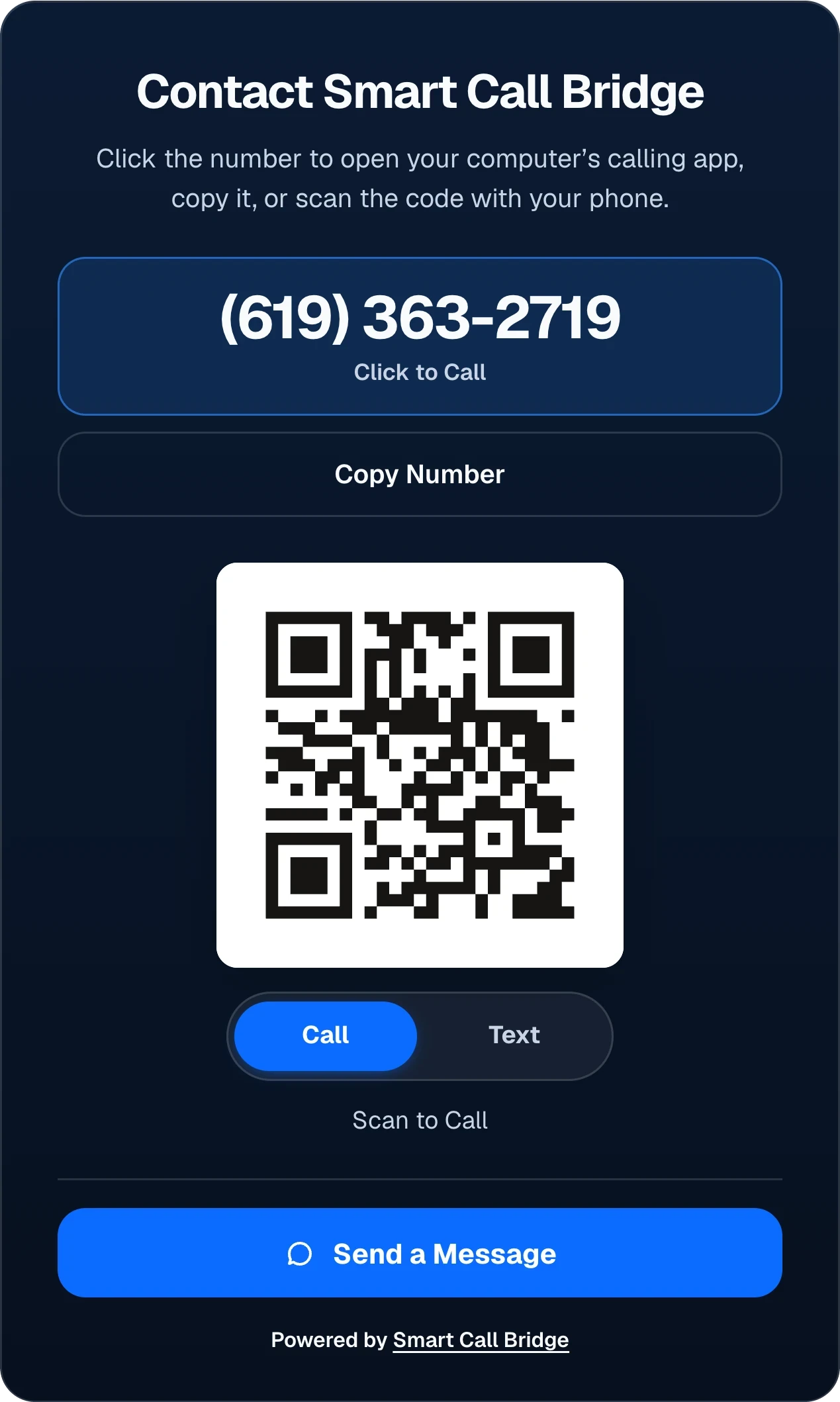
Contact Smart Call Bridge

Click the number to open your computer’s calling app, copy it, or scan the code with your phone.
(619) 363-2719

Click to Call

QR code that calls Smart Call Bridge sales at (619) 363-2719

Scan to Call

Send a Message

Powered by Smart Call Bridge

Try It Out

Contact Smart Call Bridge

Click the number to open your computer’s calling app, copy it, or scan the code with your phone.

(619) 363-2719

Click to Call

QR code that calls Smart Call Bridge sales at (619) 363-2719

Scan to Call

Send a Message

Powered by Smart Call Bridge

On desktop, a phone link can leave visitors stuck.

On desktop, a phone link can leave visitors stuck.

A click can open an unfamiliar calling app—or leave visitors without a useful next step.

A click can open an unfamiliar calling app—or leave visitors without a useful next step.

Smart Call Bridge turns that click into a contact window on your website, where visitors can call from their computer, scan a code to call or text from their phone, copy your number, or send a message.

Smart Call Bridge turns that click into a contact window on your website, where visitors can call from their computer, scan a code to call or text from their phone, copy your number, or send a message.

  1. 1. A visitor clicks your numberThey’re on a computer, visiting your website.

  2. 2. Without Smart Call BridgeThe browser may ask to open a calling app they don’t use, or the click may lead nowhere useful.

  3. 3. With Smart Call BridgeThe same click opens your contact window: call from the computer, scan to call or text, copy the number, or send a message.

On phones, tap to call works as usual.

On phones, tap to call works as usual.

Phone visitors keep what they expect: tapping your number opens the phone’s own call prompt, and Smart Call Bridge leaves it alone. The exact prompt varies by device.

Phone visitors keep what they expect: tapping your number opens the phone’s own call prompt, and Smart Call Bridge leaves it alone. The exact prompt varies by device.

  1. 1. A visitor taps your number on your website.

  2. 2. The phone asks to callIts own call prompt, shown as an illustration. The exact prompt varies by device.

How it works

How it works

One click on your number. Clear choices on any computer.

One click on your number. Clear choices on any computer.

On a laptop or desktop, a plain phone link can stall the conversation. Smart Call Bridge turns that click into options your visitor can use right away.

On a laptop or desktop, a plain phone link can stall the conversation. Smart Call Bridge turns that click into options your visitor can use right away.

01

A Visitor Clicks Your Number

Smart Call Bridge steps in on the phone links you choose whenever a visitor is on a desktop or laptop.

02

They Choose How to Reach You

A window in your colors offers click to call, a QR code to call or text from their phone, a copy button, and your contact form.

03

Phones Keep Working as Usual

On mobile, tapping your number dials it instantly. And if the script ever can’t load, your original link keeps working.

Contact options

Contact options

Four ways to reach you, in one window.

Four ways to reach you, in one window.

Every option is built for visitors at a computer, and you choose which ones appear.

Every option is built for visitors at a computer, and you choose which ones appear.

Click to Call

Opens the calling app already set up on their computer, such as FaceTime or a softphone, so they can call you in one click.

Scan to Call or Text

Visitors scan a QR code to call or text you from their phone. Turn on Text mode when your number receives messages.

Copy Number

One click copies your number, with a clear confirmation, for visitors who’d rather dial later.

Send a Message

Sends visitors straight to your existing contact form. Add your form link to show the button.

The way Smart Call Bridge routes desktop phone clicks is patent-pending technology.

Try It Out

Contact Smart Call Bridge

Click the number to open your computer’s calling app, copy it, or scan the code with your phone.

(619) 363-2719

Click to Call

QR code that calls Smart Call Bridge sales at (619) 363-2719

Scan to Call

Send a Message

Powered by Smart Call Bridge

This is our real sales line. Click to call, copy the number, scan the QR code, or send us a message.

Two Ways to Show It

Two Ways to Show It

A popup for your phone links, or a contact box on your page.

A popup for your phone links, or a contact box on your page.

Use either presentation, or both on the same site. Stacked and horizontal are layout choices for the box, not separate installations.

Use either presentation, or both on the same site. Stacked and horizontal are layout choices for the box, not separate installations.

Popup

On a computer, clicking your phone number opens the contact window over the page, and visitors close it with the X. Phones keep dialing your number directly.

yourbusiness.com (desktop)
Example Website
Call (619) 363-2719

Contact Smart Call Bridge

Click the number to open your computer’s calling app, copy it, or scan the code with your phone.

QR code that calls Smart Call Bridge sales at (619) 363-2719

Scan to Call

Powered by Smart Call Bridge
Phone links: one script tag. Your dashboard gives you the exact code.

Example
<script src="…" data-scb-site="…" data-scb-api="…" async></script>

Embedded

Place the contact box inside ordinary page content, like a blog post or your contact section. It stays on the page, with no popup and no close button. Choose a stacked or horizontal layout.

Try both layouts
yourbusiness.com/blog/make-it-easy-to-reach-youIllustrative exampleExample
Laptop, phone and tablet on a wooden desk
Blog · 3 min read

Make it easy for website visitors to reach you

Many people research a business on a laptop, then reach for their phone when they’re ready to ask a question. A good page meets them at that moment instead of sending them hunting for a number.

Put contact options next to the answers

Place a contact box beside the content people are reading. They can call from their computer, scan a code to call or text from their phone, copy the number, or send a message.

Contact Smart Call Bridge

Click the number to open your computer’s calling app, copy it, or scan the code with your phone.

QR code that calls Smart Call Bridge sales at (619) 363-2719

Scan to Call

Powered by Smart Call Bridge

Stacked layout of the Smart Call Bridge contact window: the heading, a Click to Call number, Copy Number, a QR code with a Call and Text switch, and Send a Message.
Screenshot of the stacked contact window at desktop size

Embedded box: an empty tag where the box should appear, plus the same script tag once per page.

Example
<div data-scb-inline data-scb-rule="primary"></div>
<script src="…" data-scb-site="…" data-scb-api="…" async></script>

Setup

Setup

Set up once. Publish when it looks right.

Set up once. Publish when it looks right.

Your account walks you from your website address to an installed, published window. Drafts stay private until you publish.

Your account walks you from your website address to an installed, published window. Drafts stay private until you publish.

Step 1

Step 1

Add Your Website and Number

Add Your Website and Number

Use your existing phone number and choose the contact options visitors can use.

Use your existing phone number and choose the contact options visitors can use.

Step 2

Step 2

Make It Your Own

Make It Your Own

Choose your theme and brand colors, select a contact window or inline layout, and show only the options you need.

Choose your theme and brand colors, select a contact window or inline layout, and show only the options you need.

Step 3

Step 3

Install and Publish

Install and Publish

Add the snippet to your site, or use the WordPress or Framer plugin, then manage published settings from your dashboard.

Add the snippet to your site, or use the WordPress or Framer plugin, then manage published settings from your dashboard.

Installation

Installation

One snippet. All website platforms.

One snippet. All website platforms.

Add one JavaScript snippet to your site’s header—just like adding an analytics or tracking script. It works on any website that allows custom JavaScript, including WordPress, Framer, Shopify, Squarespace, Wix and Webflow. Some platforms only allow custom code on certain plans or pages, such as checkout. We build plugins to make installation even easier: WordPress and Framer options are available at launch, with more on the way. Plugins come at no extra cost, and your Smart Call Bridge plan’s limits still apply.

Add one JavaScript snippet to your site’s header—just like adding an analytics or tracking script. It works on any website that allows custom JavaScript, including WordPress, Framer, Shopify, Squarespace, Wix and Webflow. Some platforms only allow custom code on certain plans or pages, such as checkout. We build plugins to make installation even easier: WordPress and Framer options are available at launch, with more on the way. Plugins come at no extra cost, and your Smart Call Bridge plan’s limits still apply.

Snippet Installation

Add one small snippet once, in your site’s custom-code area. Your dashboard gives you the exact code and where to place it for your platform.

Available at Launch

WordPress Plugin

An easier way to add the same snippet: connect your site from the WordPress dashboard, with no theme edits and no separate fee.

Available at Launch

Framer Plugin

Connect your Smart Call Bridge account from the Framer plugin, choose your site and add your contact window. Settings and upgrades come from your dashboard.

Available at Launch

Shopify

Works with the snippet: add it to your storefront’s theme code and manage it from the same account as your other sites. It doesn’t run on Shopify checkout pages.

Shopify app coming soon

Webflow

Works with the snippet on Webflow plans that allow custom code: add it in your site’s custom-code settings and manage it from the same account.

Webflow integration coming soon

Using Another Platform?

If your site lets you add custom JavaScript, add the snippet once in its custom-code area. Some site builders, plans or security settings don’t allow custom scripts.

Example
<script src="…" data-scb-site="…" data-scb-api="…" async></script>

Available at Launch

Steps Aside on Failure

Your phone links keep working exactly as before if the script or settings can’t load.

Drafts Stay Private

Preview changes as often as you like. Visitors only see what you publish.

Fits Your Security Policy

The install guide lists the exact addresses to allow, so your security policy stays on.

Free forever on one website.

Reporting

Reporting

Reporting you can trust.

Reporting you can trust.

See how often your contact window opens and what visitors choose next, measured from real website activity.

See how often your contact window opens and what visitors choose next, measured from real website activity.

Counted: window opens, number copies, click-to-call clicks, and contact form clicks.

On the visitor’s phone: QR scans and completed calls take place there, outside what a website can measure.

Respects privacy settings: turn analytics off and the window keeps working without sending events.

Coming Soon

Bring Your Tracking Number. Connect Your Call Reporting.

Use a tracking number you already own today. Connecting your call-tracking provider for call reporting is coming soon.

Contact Activity

marloweridgelaw.example · Last 30 days

Sample data

Window Opens

Times the window appeared

412

Click to Call

Opened a calling app request

71

Number Copied

Copy confirmed by the browser

58

Contact Form

Followed your form link

39

QR Shown

Displayed, not scanned

388

Pricing

Simple plans that grow with your websites.

Start free on one website. Upgrade when you add more sites or want more room.

Recurring plans

Billing period

Billed monthly. Every paid plan starts with a free account.

Free forever

Free

$0

Free forever on one website

Everything you need to start taking calls from one website.

Install on1 website
  • Full contact window: call, QR, copy, message
  • Designer, install snippet and reporting
  • Shows “Powered by Smart Call Bridge”
Get Started Free

No payment details required.

Your brand only

Solo

$7/month

Or $49/year with annual billing.

For one website, shown under your brand alone.

Install on1 website
  • Everything in Free
  • No Smart Call Bridge branding
  • The “Powered by Smart Call Bridge” link is removed from your widget
  • 3-day premium free trial
Get Started Free

Start free. Upgrade after signup.

For multiple sites

Team

$19/month

Or $99/year with annual billing.

For up to 10 websites in one account.

Install onUp to 10 websites
  • Everything in Solo
  • One account for every site you manage
  • 3-day premium free trial
Get Started Free

Start free. Upgrade after signup.

Best value at scale

Business

$99/month

That’s $0.99 per website/month when all 100 websites are in use.

For up to 100 websites in one account.

Install onUp to 100 websites
  • Everything in Team
  • Search and manage many sites
  • 3-day premium free trial
Get Started Free

Start free. Upgrade after signup.

Optional add-on

Call & Text Tracking

A dedicated local number for your website. Calls ring the business phone you already use, and you can see what happens after visitors reach out.

Billed monthly, separately from your plan. Calls aren’t recorded or transcribed, and no AI is used.

  • A dedicated local number for calls and texts
  • Calls forward to your existing business phone
  • Incoming texts arrive in your Smart Call Bridge inbox, with optional email notifications
  • Reports on incoming, connected and missed calls and call duration, alongside contact window opens and call clicks

Scale

More than 100 websites

Running a large portfolio? Let’s talk.

Running a large portfolio? Let’s talk.

We’ll tailor website capacity, traffic and terms to your portfolio.

Prices in USD. Each plan includes a website limit and a separate traffic allowance; no plan includes unlimited usage. If you reach your traffic allowance, optional reporting pauses while your contact window and phone links keep working.

FAQ

FAQ

Questions, answered plainly.

Questions, answered plainly.

Is the Free Plan Really Free?

Yes. Free covers one website forever; it isn’t a trial. You get the full contact window with a small “Powered by Smart Call Bridge” link and a monthly traffic allowance. Upgrade anytime to remove the Powered by Smart Call Bridge link, or choose a higher-capacity plan for more websites.

Does This Change How My Phone Links Work on Mobile?

No. On phones, tapping your number dials it directly, just like today. The contact window appears for visitors on desktop and laptop computers.

What Happens When Someone Clicks “Click to Call”?

Their computer opens its calling app, such as FaceTime or a softphone, ready to call you. No calling app set up? The QR code and Copy button are right there, so they can reach you from their phone.

Do I Need a New Phone Number?

No. Use your existing business number, or a tracking number you already own. Getting started doesn’t require changing your number.

Can Visitors Text Me Instead?

Yes. If your number receives text messages, turn on Text mode and the QR code opens a new message to you on the visitor’s phone.

Which Website Platforms Can I Use?

Any website that lets you add custom JavaScript. Add one JavaScript snippet to your site’s header—just like adding an analytics or tracking script—on WordPress, Framer, Shopify storefronts, Squarespace, Wix, Webflow and more. Some platforms only allow custom code on certain plans or pages, such as checkout. We build plugins to make installation even easier: WordPress and Framer options are available at launch, with more on the way. Need a custom integration? Contact us.

What Do the Reports Count?

Window opens, number copies, click-to-call clicks and contact form clicks: the actions your website can measure. QR scans and completed calls happen on the visitor’s phone; connecting your tracking provider for call reporting is coming soon.

How Does Smart Call Bridge Handle Analytics Consent?

Reporting is optional. When analytics is off for your site, or your site signals that a visitor hasn’t given consent, no reporting events are sent and the contact options keep working. It doesn’t connect to every consent banner automatically, and it isn’t legal advice about your site’s obligations.

What If Smart Call Bridge Can’t Load?

Your phone links keep working exactly as before. Smart Call Bridge is built to step aside whenever its script or settings can’t load.

Can I Use Smart Call Bridge on My Clients’ Websites?

Absolutely. Start free with one website, your own or a client’s. As your portfolio grows, choose Team for up to 10 websites at $19/month or Business for up to 100 at $99/month, all managed from one account. Need more than 100? Contact us for Scale.

Can I Remove the “Powered by Smart Call Bridge” Link?

Free plans show a small “Powered by Smart Call Bridge” link. Solo, Team and Business plans remove it.

Get started

Get Started Free

Free forever on one website. No payment required.

Enter only your domain. https:// is added for you.

Your website could look like this

  • Uses your existing number
  • Clear contact options on desktop
  • One snippet to install
  • Free forever on one website

Prefer to talk first?

Talk to a Person

Call us or send a question below, and we’ll reply by email. Ready now? Get Started Free and set up your first site.

This sends a message to our team. It doesn’t create an account, and we’ll only use your details to reply.

Smart Call Bridge: Bridging people. Powering possibilities.

Clear contact options for desktop visitors. Native tap-to-call on mobile.

Support

support@smartcallbridge.com

© 2026 EJS Consulting LLC

Website Designed & Developed in Framer by La Jolla Marketing